What Is Quantization? How Big AI Models Run on a Consumer PC
Updated

Download an image or video model and you’ll often find the same model in many versions, with names ending in things like fp8, Q8, Q5 or Q3. They’re all the same model, compressed by different amounts. That compression is called quantization. The version you pick decides how much of your computer’s memory the model needs, how fast it runs and how good the results look.
What’s inside a model file
The model file you download is mostly numbers, called weights or parameters. Training sets them, and they hold everything the model learned.
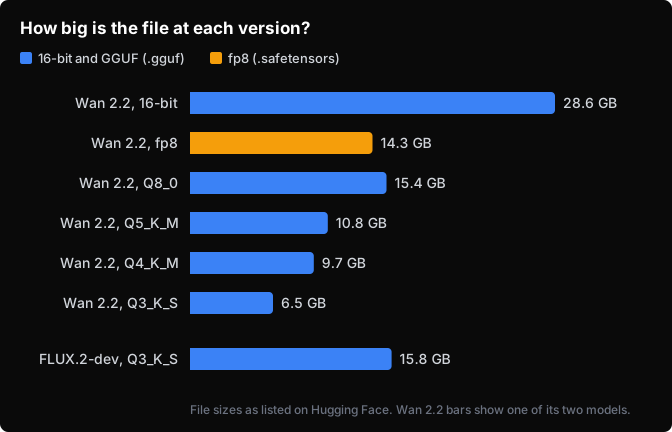
When a model is described as “14B,” it has about 14 billion of them. Models are usually released with each number stored in 16 bits, or two bytes. At that size, a 14-billion-parameter model is about 28 GB.
Most workflows also load two smaller helper models: a text encoder, which reads your prompt, and a VAE, which turns the model’s result into the final image or video. Their files count toward the total too.
Where the model sits while it runs
Your computer has two places to hold a model while it works. The graphics card’s memory, called VRAM, is fast, and it’s where the math happens. System memory, or RAM, is usually larger and slower.
A model doesn’t have to fit entirely in VRAM. ComfyUI, a popular program for running these models, keeps as much of the model on the card as it can and holds the rest in RAM. When it needs a piece that’s in RAM, it copies that piece onto the card just long enough to use it.
That copying costs less than you might expect. On our 12 GB RTX 4070 Ti, two versions of the Qwen image-edit model, 13.2 GB and 10.6 GB, both took about 9 seconds per step, even though neither fit on the card.1 In ComfyUI’s own test2, an 8 GB RTX 50603 ran Wan 2.24, a video model with two 28.6 GB halves5.
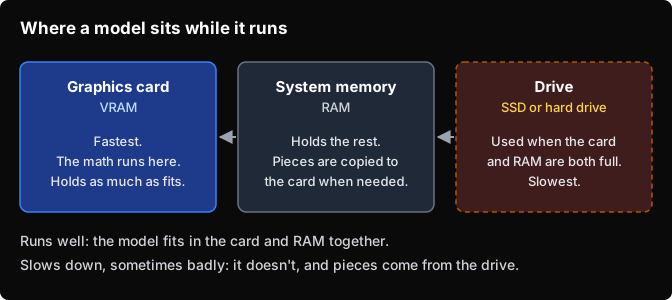
The harder limit is VRAM and RAM together. Past that, pieces come from the drive, which is slower still, but ComfyUI can still make it work.
Those two Wan 2.2 halves come to 57 GB. On a second run with the 16-bit halves, ComfyUI’s small test clip2 took 83 seconds with 32 GB of RAM and 57 seconds with 64 GB. ComfyUI calls this system Dynamic VRAM. It turns on by default6 for NVIDIA cards, and for AMD cards with ROCm 7.14 or newer, as long as PyTorch is version 2.8 or later.
It can get much worse. FLUX.2-dev7, a 32-billion-parameter image model, needed about 28 GB with its text encoder, even quantized to 3 bits: a 15.8 GB Q3_K_S file8 plus a 12.3 GB encoder. Our PC has 12 GB of VRAM and 16 GB of RAM. Both filled up, and one image took 18 minutes.1
What quantization does
Quantization stores each number with fewer bits. It works the way rounding does: 3.14159 becomes 3.14. The number takes less room and stays close to what it was.
A smaller version needs less memory, so more of it fits on the card and less has to come from the drive. For image and video models you’ll mostly meet two kinds of quantized file, and they behave differently.
GGUF files (ending in .gguf) carry the Q labels. The number is roughly the bits per weight, and K marks the newer “k-quant” method. S, M and L are sizes of the same level: M and L keep some layers at more bits, so their files are a little bigger.
In llama.cpp’s reference measurements9, Q3_K_S averages 3.6 bits per weight, Q3_K_L 4.3, Q4_K_M 4.9 and Q8_0 8.5. Wan 2.2’s Q3_K_S version5 shrinks each half from 28.6 GB to 6.5 GB. The graphics card can’t do math on these numbers directly, so each layer is unpacked back to full-size numbers10 every time it runs, which costs some speed.
fp8 files (ending in .safetensors, with fp8 or fp8_scaled in the name) store each number as an 8-bit floating-point value, about half the size of the original. “Scaled” versions also store a scale factor for each layer11, so the 8 bits can cover that layer’s actual range of values. Q8_0 is also 8-bit, but it’s a different format.
RTX 40-series and newer NVIDIA cards can do math on fp8 numbers directly, and ComfyUI uses that when the card supports it11. On older cards, fp8 weights are unpacked to 16 bits for each layer, like GGUF, so fp8 saves memory there but not time. In ComfyUI’s Wan 2.2 test2 on an RTX 5060, the fp8 version ran faster than the 16-bit one, with 32 GB of RAM and again with 64 GB.
The format also changes how fast RAM fills. Dynamic VRAM maps .safetensors files from the drive2, so the operating system can drop weights from RAM whenever something else needs the room and read them back later.
GGUF files load through an add-on, ComfyUI-GGUF12, that doesn’t use Dynamic VRAM yet. When the model doesn’t fit on the card, it copies the weights into RAM and keeps them there, so with a two-half model like Wan 2.2 the half that isn’t running can sit in RAM too. When RAM fills, the operating system moves memory onto the drive.
Text encoders come in both formats too. Wan 2.2’s usual text encoder is an fp8 .safetensors file of about 6.7 GB13, and ComfyUI-GGUF can load GGUF versions of encoders like T512.
What it costs
Rounding throws away a little information, so a quantized model is a little less accurate than the original. The fewer bits, the more you lose.
Newer image and video models tend to handle it better. The author of ComfyUI-GGUF12 found that transformer models like FLUX seem less affected by quantization than older image models built a different way. The loss still shows up: in our Qwen test, with the same prompt and seed, the 10.6 GB version drew a leg wrong and the 13.2 GB version didn’t.1
A workaround, or the way things are going?
It’s easy to read quantization as a trick for people who can’t afford a bigger card. The companies building these models use it too. OpenAI released its gpt-oss-120b14 language model with its expert layers stored in 4 bits, so it runs on a single 80 GB data-center GPU. Black Forest Labs, the company behind FLUX.2, publishes its own 4-bit version of FLUX.2-dev15.
Hardware is being built around it as well. NVIDIA’s RTX 50-series cards have circuits for 4-bit math, and NVFP4 is a format made to use them. ComfyUI reports16 that NVFP4 models run up to about twice as fast as 8-bit or 16-bit versions on those cards, so a smaller model can also be a faster one. That needs PyTorch built for CUDA 13.0; without it, ComfyUI says NVFP4 can run up to twice as slow as fp8.
Bigger cards won’t make the problem go away soon. NVIDIA’s top gaming card had 24 GB in 202017 and 32 GB in 2025. Over a shorter stretch, Black Forest Labs’ main open image model went from 12 billion parameters with FLUX.118 in 2024 to 32 billion with FLUX.27 in 2025. RAM is getting more expensive too, because AI data centers are buying more memory than manufacturers can make19. ComfyUI named rising RAM prices2 as the reason it rebuilt how it splits models between the card and RAM.
Picking the right version
Add up every file your workflow loads, including the text encoder and VAE. Compare that total to your VRAM plus your RAM, and leave a few gigabytes of RAM for your operating system and other programs. With .gguf files, count both halves of a two-part model against RAM, even though only one runs at a time.
On an RTX 40-series or newer card running Dynamic VRAM, an fp8 file can beat a smaller GGUF: it skips the unpacking step, and RAM doesn’t fill with idle weights. GGUF is the way to go below 8 bits, or on a setup outside Dynamic VRAM.
fp8 won both times we tested it on our 12 GB RTX 4070 Ti with 16 GB of RAM. Qwen image-edit’s 20.5 GB fp8 file ran at 5.8 seconds per step against 9.7 for its 13.2 GB Q4_K_M, with near-identical output. Wan 2.2’s fp8 pair made a 49-frame clip in 594 seconds, and its Q3_K_S pair, less than half the size, took 723.1
If the full-size version fits, start there, because spilling from the card into RAM usually costs little speed. If it doesn’t fit, step down one version at a time until it does. Once the total passes your VRAM and RAM, pieces come from the drive, and speed drops, sometimes badly.
When two versions both fit, run the same prompt on each and time them. On your machine, the smaller one may not be any faster, and it may look worse.
For that math worked through on a model most cards can’t hold, see what MiniMax-H3 actually requires. For a quantized model running on a 12 GB card, see local lip-sync with InfiniteTalk.
Sources
Footnotes
-
FlixML tests on a 12 GB RTX 4070 Ti with 16 GB of RAM, September 2026, each pair with the same input, prompt and seed. Qwen-Image-Edit-2511 at 832x1248, 20 steps: Q4_K_M (13.2 GB) and Q3_K_L (10.6 GB) at 9.2 and 9.4 seconds per step; in a later pair, fp8 (20.5 GB) at 5.8 and Q4_K_M at 9.7. Wan 2.2 image-to-video at 768x528, 49 frames, 30 steps: fp8_scaled pair 594 seconds (a file download was running on the same PC), Q3_K_S pair 723 seconds. FLUX.2-dev at Q3_K_S with its text encoder: 18 minutes for one image. ↩ ↩2 ↩3 ↩4
-
ComfyUI blog: Dynamic VRAM: how ComfyUI keeps weights in RAM and copies them to the card layer by layer, reloads them from disk when memory runs short, and its Wan 2.2 fp16 and fp8 benchmark on an RTX 5060 with 32 GB and 64 GB of RAM. Also its reason for the change (rising RAM prices). ↩ ↩2 ↩3 ↩4 ↩5
-
NVIDIA RTX 5060: 8 GB of memory. ↩
-
Wan 2.2 I2V-A14B model card: two experts of about 14 billion parameters each. ↩
-
Wan 2.2 I2V GGUF files and 16-bit files: file sizes at each version. ↩ ↩2
-
ComfyUI main.py and pull request #15633: Dynamic VRAM is on by default for NVIDIA, and for AMD with ROCm 7.14 or newer (merged August 2026), and needs PyTorch 2.8 or later. ↩
-
FLUX.2-dev model card: 32 billion parameters. ↩ ↩2
-
FLUX.2-dev GGUF files: the Q3 file size. FLUX.2 text encoders: the smallest is 12.3 GB. ↩
-
llama.cpp quantization guide: bits per weight for each level (Q3_K_S 3.64, Q3_K_L 4.30, Q4_K_M 4.89, Q8_0 8.50). ↩
-
ComfyUI-GGUF ops.py: GGUF weights are dequantized when each layer runs. ↩
-
ComfyUI model_management.py: fp8 math is enabled on NVIDIA cards with compute capability 8.9 or newer (RTX 40-series on); otherwise ops.py dequantizes the weights per layer. utils.py: scaled fp8 files carry a per-layer weight scale. ↩ ↩2
-
ComfyUI-GGUF: transformer models seem less affected by quantization. Its loader code copies weights out of the file into memory after the first load, and Dynamic VRAM support is an open, unmerged pull request. ↩ ↩2 ↩3
-
Wan 2.2 text encoders: umt5_xxl fp8 at 6.7 GB. ↩
-
gpt-oss-120b model card: MXFP4 (4-bit) weights, runs on a single 80 GB GPU. ↩
-
FLUX.2-dev NVFP4: Black Forest Labs’ own 4-bit release. ↩
-
ComfyUI blog: NVFP4 on NVIDIA GPUs: about 2x speed on RTX 50-series with PyTorch cu130, up to 2x slower than fp8 without it. ↩
-
NVIDIA RTX 30 series announcement: RTX 3090, 24 GB, 2020. RTX 50 series announcement: 2025. RTX 5090: 32 GB. ↩
-
FLUX.1-dev: 12 billion parameters, released 2024. ↩
-
CNBC: AI memory is sold out: AI demand outpacing memory supply, and TrendForce’s forecast of a 50–55% DRAM price rise in the first quarter of 2026. ↩
In the model directory
Wan 2.2 — ~12 GB (fp8)
Image-to-video and text-to-video that fits a single consumer GPU once quantized.
In the model directory
Qwen-Image-Edit-2511 — ~12 GB
Instruction-driven image editing — re-angle a shot or change a pose from plain English, holding identity and lighting.
In the model directory
FLUX.2 — 8 GB for Klein 4B; 24 GB+ for dev
Higher-fidelity image generation than SDXL. The distilled Klein 4B runs on 8 GB in seconds; full dev needs a 24 GB card.