FLUX.2 Klein Reference Edit
Image → ImageGenerate a new image from a reference image and a plain-English instruction. FLUX.2 Klein 4B reads the reference as conditioning and samples a fresh frame, so unlike img2img it can change pose, wardrobe and setting while holding the subject's identity. Say what changes and what stays.
flux2_klein_edit8 GB VRAM8.3 GB of weightsLoRA support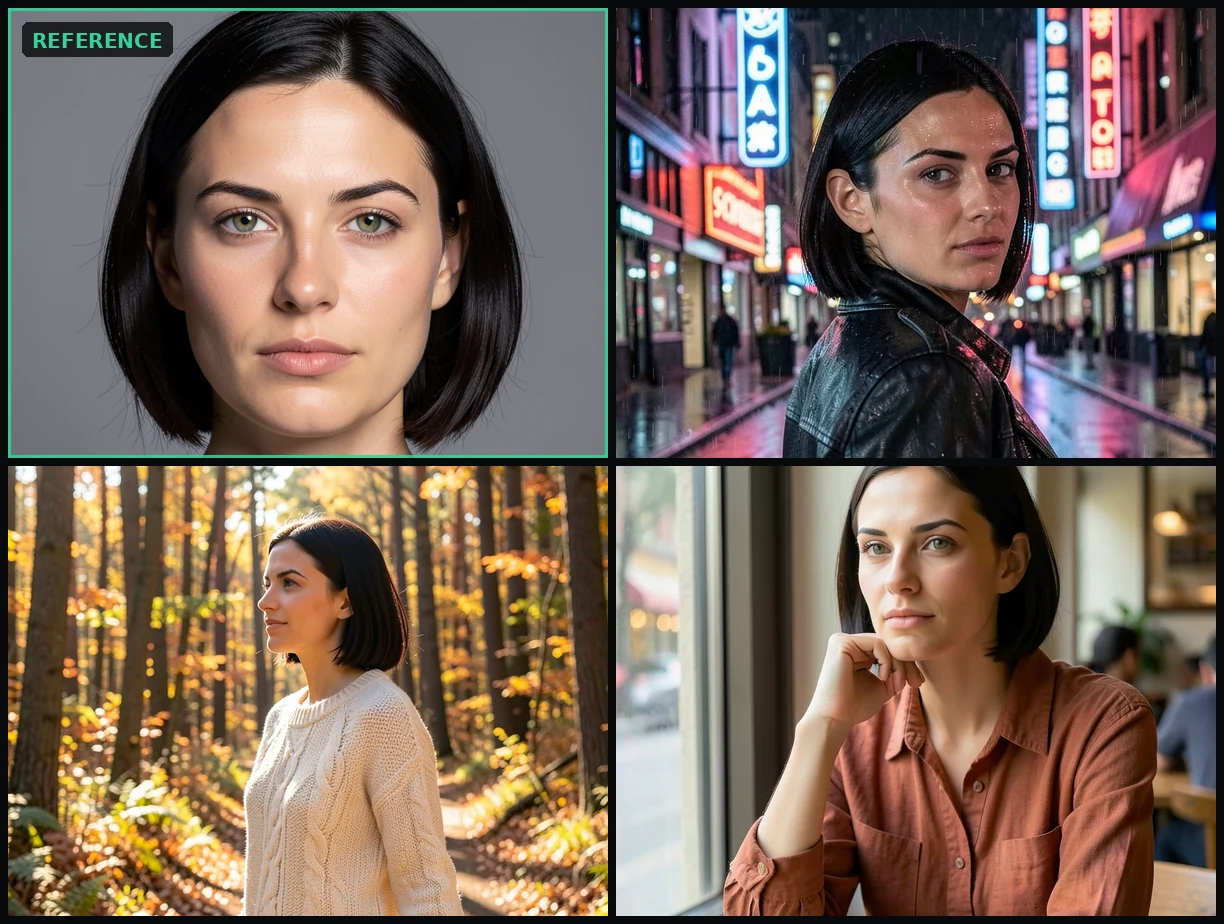
flux2_klein_edit on our own hardware. The reference, then three images generated from it — new wardrobe, new setting, new pose, same face. Each edit is one instruction: name the change, name what stays.What this is
Reference editing: hand the model one picture of a subject and an instruction, and get that subject somewhere else entirely.
FLUX.2 Klein 4B is Black Forest Labs' compact model, and it does two jobs with one set of weights: generate an image from text, or take reference images and edit from them. There is no second checkpoint for the editing half — the same 8.3 GB of weights cover both, which is why a machine that can already run Klein for text-to-image can do this for free.
The technique it enables is reference editing, and it is not image-to-image. Image-to-image re-samples the source picture, so the output is a repaint of that frame and the composition is fixed before the first step — a reason it can recolour a jacket but never turn a subject around. Reference editing encodes the reference and attaches it to the conditioning instead, then samples from an empty latent: the model is told about the subject rather than started from their frame. Identity travels; composition does not.
So it is the tool for making more pictures of a subject you already have — new pose, new wardrobe, new place, same person — without training a LoRA on them. It is the wrong tool for a small in-place fix, because the frame is regenerated rather than patched, and it is not a substitute for a trained likeness when the match has to be exact.
The graph follows ComfyUI's official FLUX.2 Klein 4B editing template. Klein is distilled: four steps, cfg 1.0. Raising either fights the distillation rather than improving the result.
Because the reference already carries the subject, describing them again in words competes with it. Black Forest Labs' own editing guidance is written as instructions: name what changes, and name what stays. Their examples read "Change the woman's outfit to a bold fuchsia pink dress against a green studio gradient background" and "Add a short fluffy jacket on her… Keep her pose" — the subject themself is never re-described.
We proved this on our own install. The same reference at the same seed, once with a prompt that described the subject's face and once with a prompt that only named the change and ended "keep their face and hair exactly as they are": the instruction-style prompt tracked the reference's bone structure and hairline noticeably better.
The same run showed the limit. A small, low-contrast detail in the reference — a scar — survived in neither attempt. Naming it in the prompt did not copy it; it made the model draw its own version. Fine detail is what extra reference images are for, not extra words. Black Forest Labs' reference-count table gives FLUX.2 Klein 4B up to four; this graph wires one, which is the honest ceiling on what a single image can carry.
Where this comes from
- Black Forest Labs — Single-Reference Editing“Be specific about what should change and what should stay.”
- Black Forest Labs — Image Editing overview“More reference images means more control. Use multiple inputs to maintain character consistency, combine furniture from different photos, or transfer styles — all in a single generation.”
- ComfyUI — FLUX.2 Klein 4B guide“Unifying text-to-image and image editing in one compact architecture… strong quality for single- and multi-reference editing.”
Calling it
FlixML has no generate button: you tell your agent what you want and it calls the API on your install. The id is what names this workflow.
POST /api/image/generate
{
  "workflow": "flux2_klein_edit",
  "image": "...",
  "prompt": "..."
}
Parameters
imagestrrequiredReference image filename, as returned by /api/images/upload or a prior job
promptstrrequiredAn instruction, not a scene description. Name the change, then name what stays: 'Change her outfit to a black leather coat and place her on a castle rampart at dusk. Keep her face and hair exactly as they are.' Never re-describe the subject's face, hair or body — the reference carries them, and describing them again makes the model draw its own version instead.
seedintRandom seed (auto if omitted)
lora_namestrdefault Optional LoRA file in the node's loras folder. Leave empty and the slot is removed from the graph entirely. A FLUX.2 LoRA is built for one variant: a Klein 4B LoRA does not load on Klein 9B or on FLUX.2-dev, and a dev LoRA does not load here — the residual stream is 3072 wide on 4B against 6144 on dev, so the tensors do not fit. Match the LoRA's stated base model to the weights in the unet param.
lora_strengthfloatdefault 1Weight of the first LoRA. Ignored when lora_name is empty.
lora_name_2strdefault Second LoRA, chained after the first — for stacking a concept LoRA on top of a likeness or style one. Same variant rule as lora_name.
lora_strength_2floatdefault 1Weight of the second LoRA. Ignored when lora_name_2 is empty.
stepsintdefault 4Klein is distilled to 4 steps; raise it only when running undistilled FLUX.2 weights through the unet param
cfgfloatdefault 1Distilled Klein runs at 1.0. Raising it fights the distillation
samplerstrdefault eulerreference_megapixelsfloatdefault 1The reference is scaled to this many megapixels before encoding, and the output inherits its size
unetstrdefault flux-2-klein-4b-fp8.safetensorsclipstrdefault qwen_3_4b_fp4_flux2.safetensorsvaestrdefault flux2-vae.safetensorsYour install is the source of truth: GET /api/workflows returns these parameters as they are on your machine.
What it costs to run
Same weights as flux2_klein — FLUX.2 Klein 4B fp8 plus the Qwen3-4B encoder — so any node that runs flux2_klein runs this. The reference is VAE-encoded and attached to both conditioning branches through ReferenceLatent; sampling starts from an empty latent, which is why the output is a new frame rather than a repaint of the source. Output size follows the reference's aspect after it is scaled to reference_megapixels. Graph follows the official ComfyUI template image_flux2_klein_image_edit_4b_distilled (docs.comfy.org/tutorials/flux/flux-2-klein). Klein 4B accepts up to four reference images (docs.bfl.ml/guides/prompting_editing_overview); this graph wires one. A fine detail that is small or low-contrast in a single reference — a scar, a tattoo, a logo — may not survive, and naming it in the prompt makes the model draw its own rather than copy it. More references is the lever for that, not more words.
Same input, different job
Qwen Multi-Angle (re-angle a still)
Re-shoot an existing image of the same subject from a new camera angle. Qwen-Image-Edit-2511 + multi-angle LoRA holds identity, clothing, and lighting while changing the camera viewpoint. Produces a sibling of the source still at a different angle.
Qwen Pose/Position Edit (instruction)
Edit an existing image from a plain-English instruction — change a subject's pose, position, or what they're doing while holding their identity, clothing, the room, and lighting. Powered by Qwen-Image-Edit-2511; the source image is the reference (no LoRA).
SDXL Image-to-Image
Generate SDXL image variations from a source image using prompt guidance and denoise strength